


Wednesday afternoon, 2:47 PM. Your most reliable client just canceled his 3:30 slot. Peak hours, chair empty, and you've got eight guys on your waitlist who'd probably take it. But half those numbers might be outdated, the other half are at work, and by the time you figure out who can actually come in, it's 3:25 and the chair stays empty.
This happens in barbershops everywhere. Not because shops don't have waitlists, but because the barbershop waitlist workflow usually consists of sticky notes, random text threads, and whoever happens to remember that Mike said he wanted Thursdays if something opened up.
The real kicker? Most shops lose somewhere between $400-600 weekly from unfilled last-minute cancellations. That's roughly $24,000 a year sitting in empty chairs during your busiest hours.
The waitlist reality check
A functioning waitlist isn't just names and numbers. It's understanding who actually shows up when you call them at 2 PM on a Tuesday versus who only wants prime Saturday slots. It's knowing which clients will drive across town for a same-day opening versus the ones who need three days' notice minimum.
Most shops treat their waitlist like a FIFO queue—first in, first out. Makes sense on paper. Falls apart in practice. The guy who signed up six weeks ago for "any opening" probably found another barber by now. Meanwhile, the client who asked yesterday about weekend slots is ready to book immediately.
What actually moves the needle is a prioritization system built around three things that matter:
-
Recency of request
-
Historical show-up rate
-
Flexibility window
You've got a 4 PM cancellation. Do you call the guy who's been on your list two months but has no-showed twice? Or the regular who mentioned yesterday he'd take any afternoon slot this week? The answer seems obvious, yet most shops default to calling down an outdated list until someone picks up.
Building your prioritization matrix
Your waitlist needs tiers. Not complicated, just practical.
Never miss a booking amidst the hustle.
Trimzly helps you schedule, confirm, and manage every client visit seamlessly.
- Unified appointment management
- Automated client reminders
- Optimized staff scheduling
No credit card required
Tier 1: Hot leads Requests from the last 72 hours. Client specifically asked about this week. They've shown up to previous last-minute bookings. These get called first, always.
Tier 2: Flexible regulars Clients who've said "call me anytime something opens." They have a track record of actually coming when called. Usually been on the list 3-10 days.
Tier 3: Specific requesters Want particular days or times only. "Only Saturdays after 2 PM" or "Weekday mornings only." You call them when their criteria match and not otherwise.
Tier 4: Cold storage Anyone on the list over two weeks without reconfirming interest. Most of these should honestly be purged monthly.
Here's what this looks like operationally:
| Cancellation Window | Contact Tier 1 | Contact Tier 2 | Contact Tier 3 | Skip to Next Day |
|---|---|---|---|---|
| 2+ hours notice | First 3 | Next 2 | If match | - |
| 1-2 hours | First 5 | - | - | After 15 min |
| Under 1 hour | First 2 | - | - | After 5 min |
| Walk-in no-show | Text blast Tier 1 | - | - | Immediately |
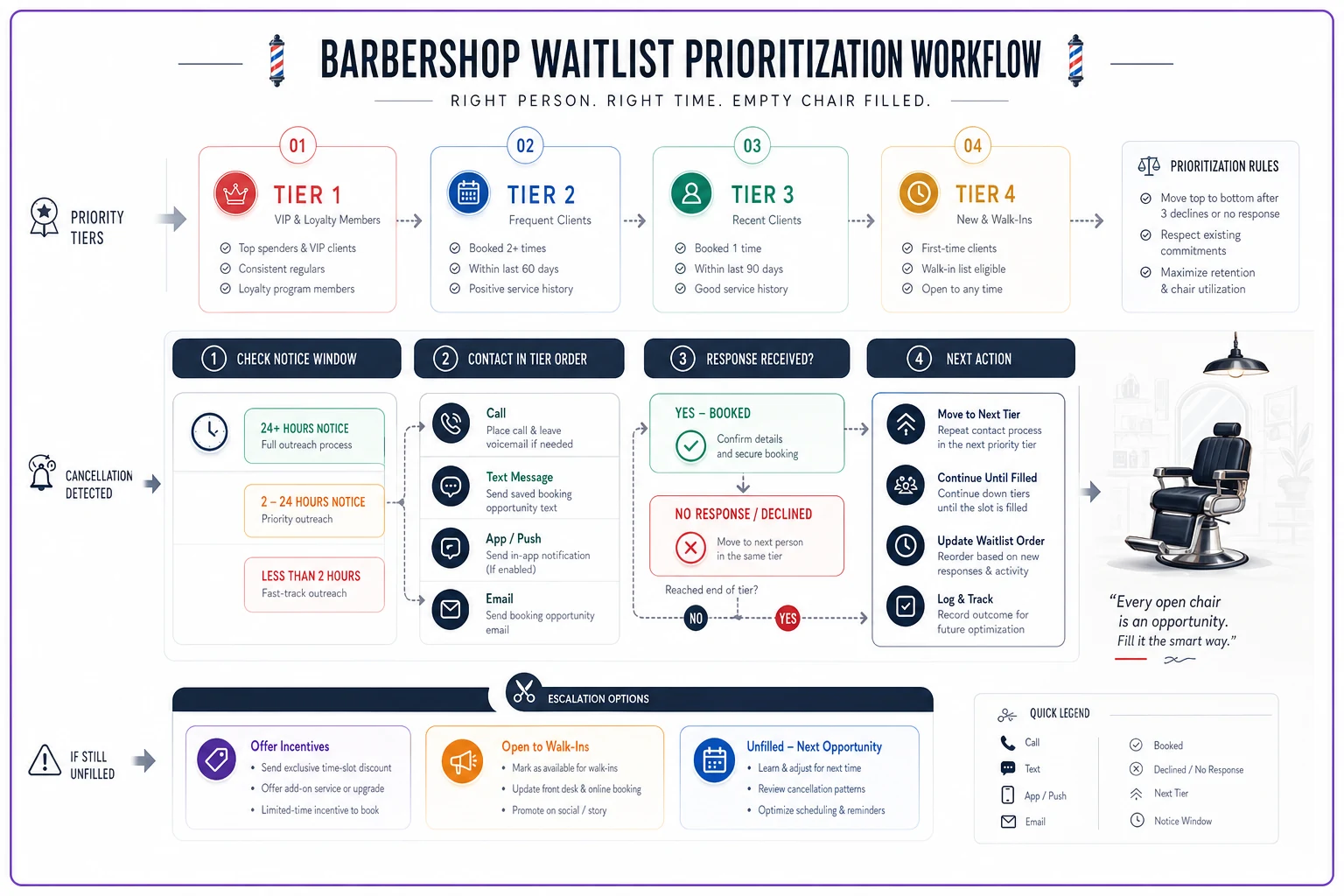
The numbers here matter. Calling five people for a one-hour-out cancellation sounds excessive, but response rates drop to around 20% for anything under two hours' notice. You need the volume to get one confirmation.
Timing your outreach
Contact timing kills most waitlist attempts. Shops either reach out too early and the client forgets, or too late and they can't make it.
For morning cancellations (before noon):
-
Previous evening between 6-8 PM works best
-
Morning of, before 8 AM as backup
-
Avoid morning commute window (7-9 AM)
For afternoon cancellations (noon-5 PM):
-
Same day, at least 2-3 hours before minimum
-
Lunch hour (11
30 AM-1 PM) gets the highest response rate
-
After 2 PM, switch to incentive messaging
For evening cancellations (after 5 PM):
-
Minimum 3 hours' notice during the workday
-
4-hour notice for anyone with kids
-
After 3 PM, only contact Tier 1 flexible clients
Lunch hour messaging tends to get the best response—use it as your primary afternoon outreach window.
The sweet spot for standard waitlist contact is 3-4 hours before the slot. Gives clients time to rearrange without feeling rushed. Under two hours, you're competing with their existing plans.
Same-day incentive templates
Nobody rearranges their afternoon for a regular haircut at full price on 45 minutes' notice. But they might for the right offer. The key is making the incentive feel exclusive, not desperate.
The time-sensitive exclusive: "Hey [Name], just had a 3:30 opening pop up today only. Can offer 15% off your cut if you can make it. Slot expires in 20 mins if you can't take it."
The add-on bundle: "Got a cancellation at 4 PM today. If you can make it, I'll throw in a complimentary beard trim with your cut. Let me know in the next 10 mins."
The loyalty accelerator: "Last-minute opening at 2 PM. Take it today and I'll count it as 2 visits toward your 10-cut loyalty card. Quick response needed."
These aren't desperate pleas or massive discounts. You're offering value for flexibility. The urgency is real and the benefit is specific.
Avoid these mistakes:
-
Offering more than 20% off (reads as desperate)
-
Not setting a response deadline (they'll sit on it for hours)
-
Same incentive every time (becomes expected, not special)
-
Discounting premium services (hot towel shave should stay premium)
The key is offering value that feels exclusive, with clear deadlines so clients act fast.
Manual versus automated outreach
Automation isn't always better. Some scenarios need the personal touch, others need speed and scale.
When to keep it manual:
-
High-value clients ($50+ per visit)
-
Specific service requests (designs, color, treatments)
-
Peak Saturday slots
-
Clients with complicated schedules
-
First-time waitlist contacts
Manual outreach for these because the conversation matters. "Hey Marcus, know you wanted a Saturday design appointment. Just had a 2 PM open up, would that work?" beats an automated "OPENING AVAILABLE - REPLY YES TO BOOK."
When automation makes sense:
-
Weekday afternoon slots
-
Standard cuts only
-
Mass notifications for walk-in no-shows
-
Tier 2-3 initial outreach
-
Confirmation reminders
The automation sweet spot is volume scenarios where personalization doesn't significantly impact conversion. Tuesday 2 PM regular cut? Blast it out. Saturday 11 AM with your top barber? Pick up the phone.
| Scenario | Method | Contact Order | Response Window |
|---|---|---|---|
| Premium slot (Sat AM) | Manual call | Top 3 clients | 30 minutes |
| Weekday standard | Auto text | Tier 1 batch | 15 minutes |
| Same-day under 2hr | Auto + manual | Blast then call | 10 minutes |
| Next-day opening | Auto text | All tiers matched | 2 hours |
| Walk-in no-show | Auto blast | Tier 1 only | Immediate |
Pick the method based on slot value and expected conversion. Human for premium, automated for volume.
Scripts that actually work
Forget the polished corporate scripts. Real barbershop conversations don't sound like customer service manuals.
For manual calls (regular client): "Hey Mike, it's [Name] from [Shop]. You mentioned wanting Tuesday afternoons—just had a 3:30 open up today. Can you make it? Need to know pretty quick, got others waiting."
For manual calls (new waitlist): "This is [Name] from [Shop]. You're on our waitlist for this week. Got a 4 PM today if you can swing it. You interested? Gotta fill it in the next 10 minutes."
For automated texts (standard): "[Shop Name]: 2 PM opening TODAY. Reply YES to claim. Expires in 15 min. Standard cut only."
For automated texts (incentive): "[Shop Name]: Last-minute 3:30 PM today. 15% off if you can make it. Reply YES now. Expires 3:15."
The pattern: immediate identification, specific slot, clear action, real deadline. No fluff.
What not to say:
-
"Sorry to bother you..." (you're offering them what they wanted)
-
"If you're interested..." (be direct)
-
"Let me know when you can" (you need an answer now)
-
"We had a cancellation" (focuses on the negative)
Be direct, specific, and time-limited. That's what gets quick responses.
Escalation rules that prevent chaos
When your first-choice client doesn't respond, most shops either give up or panic-call everyone. You need escalation rules.
Standard escalation (2+ hours notice):
-
Contact Tier 1 (wait 15 minutes)
-
Contact Tier 2 (wait 10 minutes)
-
Add incentive, recontact Tier 1 (wait 10 minutes)
-
Blast all matched tiers with incentive
Rush escalation (under 2 hours):
-
Simultaneous contact top 5 from any tier (wait 5 minutes)
-
Incentive blast all Tier 1 (wait 5 minutes)
-
Call top 2 respondents directly
-
Convert to walk-in slot
The abort protocol:
-
Under 30 minutes
stop trying, mark as walk-in
-
After 3 contact attempts
remove from current round
-
No response twice
move down one tier
-
Three strikes
off the waitlist completely
Hard stops matter. Otherwise you're texting people about slots that already passed, which kills your credibility for next time.
Tracking what matters
Most shops track nothing. You need to track three things at minimum:
Contact-to-show rate: What percentage of contacted clients actually show up? Should be above 30% for Tier 1, above 20% for Tier 2. Below that, your list is stale.
Fill rate by time window: What percentage of cancellations get filled based on notice time? Two hours out should be 70%+, one hour around 40%, under one hour maybe 25%.
Incentive ROI: Does offering 15% off to fill a $30 slot beat leaving it empty? Obviously yes, but track which incentives actually drive action versus which just train clients to wait for discounts.
A basic tracking sheet:
| Week | Cancellations | Filled | Fill Rate | Avg Notice | Revenue Recovered |
|---|---|---|---|---|---|
| 1 | 12 | 7 | 58% | 2.5 hrs | $245 |
| 2 | 8 | 6 | 75% | 3.1 hrs | $210 |
| 3 | 15 | 8 | 53% | 1.8 hrs | $280 |
| 4 | 10 | 7 | 70% | 2.9 hrs | $245 |
Fill rate trending down? Your list is getting stale. Average notice time dropping? You probably need to revisit your cancellation policy.
The operational reality
Running a proper barbershop waitlist workflow takes about 20-30 minutes of actual work daily, but those minutes need to happen at specific times. Morning list review. Cancellation response. End-of-day list update. Evening outreach for next-day openings.
The problem is those minutes are scattered throughout the day, usually while you're mid-cut. This is where having clear protocols matters. Anyone at the front should be able to execute the waitlist process without asking twenty questions.
Some shops are moving toward AI-powered operational software that handles the routine parts—tracking tiers, sending initial outreach, managing response windows. The human touch stays for high-value situations, but the systematic parts run automatically. Makes sense when you consider the average shop spends 3-4 hours weekly on waitlist management that could be 80% automated.
But even without that, a documented process beats winging it every single time. Print your escalation rules. Save your text templates. Track your basic numbers.
Making this actually stick
Start with one thing: tiered categorization. Just organize your current waitlist into the four tiers. Takes maybe 20 minutes. Then implement the contact timing for one week. Don't try to perfect everything at once.
Week 1: Organize into tiers Week 2: Implement contact timing Week 3: Add incentive templates Week 4: Set up escalation rules
Shops that try to implement everything at once end up doing nothing consistently. Build the habit first, then layer in optimization.
The shops recovering $400+ weekly from cancelled appointments aren't doing anything magical. They're following a process, tracking what works, and adjusting based on results. They treat their waitlist like the revenue stream it actually is.
The bigger picture
Your waitlist is basically a backup revenue system. Every cancellation is a potential loss that a working waitlist converts back into income—but only if you treat it like an operational priority, not an afterthought.
Think about last month. How many empty chairs during peak hours? How many last-minute cancellations went unfilled? Multiply that by your average ticket. That's what a functioning waitlist workflow is worth.
The best part about systematizing this: it compounds over time. You learn which clients are truly flexible, which incentives drive action, what timing works for your specific clientele. After a few months, filling cancellations becomes automatic rather than chaotic.
The question isn't whether you need a better system. It's whether you'll build one before losing another few thousand to empty chairs.
Ready to elevate your barbershop operations?
Join 500+ barbershops using Trimzly to save time, reduce scheduling conflicts, and enhance client satisfaction.