



Most barbershops are carrying somewhere between $8,000 and $15,000 in product inventory at any given time. That number tends to catch owners off guard when they actually sit down and do the math. Walk through your shop and add up retail products, backbar supplies, capes, towels, cleaning supplies, consumables—it adds up faster than you'd expect.
The real problem isn't the dollar amount sitting on shelves. It's that most shops have no clear picture of which products move fast enough to justify their space, when to reorder before actually running out, or whether their suppliers are offering decent terms compared to what's out there.
Running out of your best-selling pomade on a Saturday costs you retail revenue and irritates regular clients. But sitting on twelve bottles of a premium beard oil that only sells twice a month ties up cash you need for payroll. Both problems come from the same place—operating without clear inventory targets or reorder systems.
SKU-level stock turn targets that actually match barbershop reality
Stock turn rate tells you how many times per year you sell through your entire inventory of a specific product. A turn rate of 12 means you're moving your full stock once a month. A turn rate of 4 means that product sits around for three months before selling through. Different product categories need completely different turn targets. Retail styling products should move way faster than specialty items. Here's what realistic targets look like based on how most barbershops actually operate:
High-velocity products (target 8-12 turns annually)
-
Popular pomades and styling creams
-
Basic hair oils and beard balms
-
Travel-size products near checkout
-
House-brand basics
These items should sell through every four to six weeks. If a pomade is sitting longer than two months, either the price is off, placement is bad, or clients just don't want it. Cut the order quantity or drop it entirely.
Medium-velocity products (target 4-8 turns annually)
-
Premium styling products
-
Specialized treatments
-
Mid-tier beard care
-
Seasonal items during their peak months
Selling through every six to twelve weeks is completely normal for this tier. The key is keeping quantities lean enough that you're not stuck with dead stock.
Slow-moving specialties (target 2-4 turns annually)
-
Ultra-premium products
-
Niche treatments
-
Gift sets
-
Specialty retail tools
These might only move once every few months, and that's fine if margins are healthy. Just don't order more than a three-to-four month supply at a time.
Backbar and consumables (target 12-24 turns)
-
Shampoos and conditioners for service use
-
Neck strips and capes
-
Razors and blade refills
-
Cleaning supplies
Working supplies should turn monthly or faster. If backbar products are lasting longer than six weeks, you're either over-ordering or have a usage problem worth investigating.
The mistake shops make is treating all inventory the same. They order six bottles of everything—whether it's their fastest-selling pomade or a specialty product one client requested. Then they wonder why cash feels tight despite solid revenue.
Building reorder formulas that factor in real constraints
Standard reorder point math says: when inventory drops to (daily usage × lead time + safety stock), place an order. Barbershops face two complications that mess with this formula.
Never miss a booking amidst the hustle.
Trimzly helps you schedule, confirm, and manage every client visit seamlessly.
- Unified appointment management
- Automated client reminders
- Optimized staff scheduling
No credit card required
First, supplier minimum order quantities force you to buy more than the formula actually calls for. Second, inconsistent product sales make "daily usage" nearly impossible to calculate with any real accuracy.
Here's how to build something that works in practice:
Step 1: Track your real consumption rate
Don't guess. Pull three months of sales data for each SKU. Calculate weekly average sales, then add a 30% buffer for variability. If you sold 18 bottles of pomade over 12 weeks, your consumption rate is 1.5 per week, buffered to 2.
Step 2: Identify true lead time
Most suppliers quote 3-5 day delivery, but that's from when they process the order. Add a couple of days for order processing, potential backorders, and receiving time. Your real lead time is probably closer to 7-10 days.
Step 3: Calculate base reorder point
Multiply buffered weekly consumption by lead time in weeks. At 2 units per week with a 10-day lead time, reorder when you hit 3 units remaining.
Step 4: Adjust for MOQs
If your supplier requires ordering in cases of 6, adjust the timing accordingly. Order when you have enough stock to last through lead time but still have room to receive a full case without overflowing storage. That might mean ordering at 4 units instead of 3.
Step 5: Build in promotional flexibility
For products you promote regularly, raise the reorder point before promotion periods. If you normally sell 2 pomades weekly but push 8 during your monthly special, adjust reorder points the week before.
Use this simple workflow as a checklist when setting reorder points.
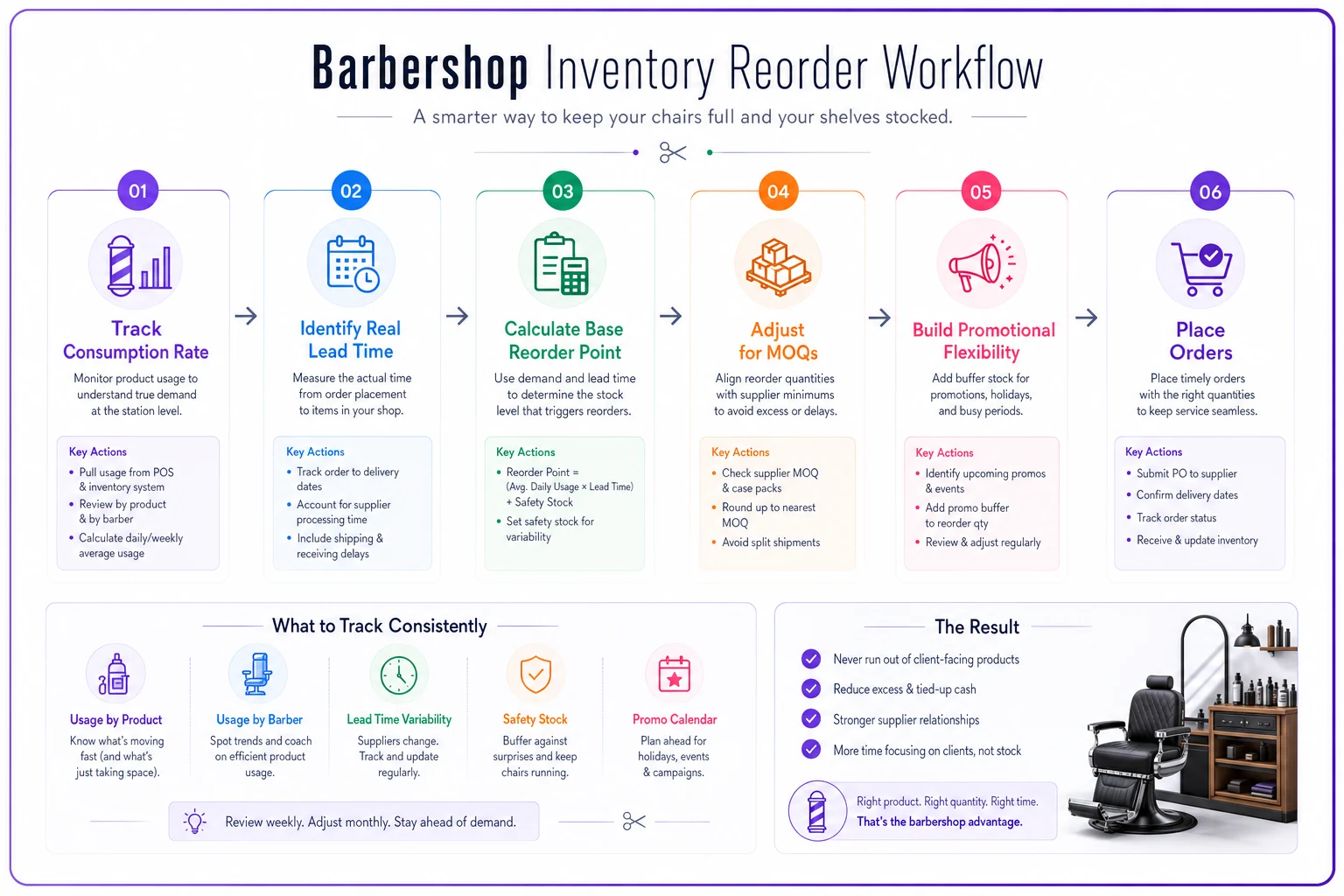
The visual maps tracking consumption, calculating lead time, computing reorder points, adjusting for supplier MOQs, and timing orders for promotions.
A working example: your shop sells about 6 bottles of a popular beard oil monthly (roughly 1.5 weekly). The supplier delivers in 8 days with a 4-bottle minimum. Your reorder point becomes 2 bottles (1.5 × 1.5 weeks), but you order 4 at a time—giving you around 2.5 weeks of supply per order.
This prevents both stockouts and excess inventory. The math isn't perfect—barbershop sales are too unpredictable for that—but it beats guessing or panic-ordering when shelves look thin.
Negotiating better MOQs without burning supplier relationships
Minimum order quantities are a real cash flow problem for small shops. Suppliers push MOQs to streamline their operations, but those requirements rarely match single-location reality. You end up ordering 12 bottles to get the product you need, then 8 sit on the shelf for months collecting dust.
MOQs are more negotiable than suppliers initially let on, especially once you've established a payment history.
Start with mixed-SKU minimums
Instead of meeting MOQs per product, negotiate for total order minimums across multiple SKUs. Rather than buying 6 bottles each of three products, ask if you can order 2 bottles each of nine products for the same $150 minimum. Most suppliers prefer consistent total revenue over rigid per-item requirements.
Propose stepped pricing
Offer to pay 5-8% more per unit for quantities below standard MOQs. If the supplier's 6-unit price is $12, offer $13 for orders of 3-5 units. This covers their handling costs while giving you flexibility. A lot of suppliers will take this deal once they trust your reliability.
Bundle consumables with retail products
Suppliers often apply different MOQ rules to different categories. Use high-turnover consumables—neck strips, razors—to meet order minimums, then add smaller quantities of retail products. You were buying the consumables anyway, and it unlocks flexibility on slower-moving items.
Time orders strategically
Track when suppliers run promotions or need to move inventory. End of quarter, they're often more flexible on MOQs to hit sales targets. Before new product launches, they'll sometimes waive minimums on older stock. Mark these patterns somewhere and plan orders around them.
Note suppliers' end-of-quarter flexibility in a calendar so you can time orders when they're most likely to loosen MOQ rules.
Test exclusive arrangements
For your top two or three selling products, propose exclusivity in exchange for lower MOQs. You'll only carry their pomade if they let you order 3 units at a time instead of 6. Suppliers value exclusive placement enough to bend MOQ rules, especially in busy shops.
Frame these conversations around long-term partnership value, not single-transaction terms. Show purchase history, payment reliability, and growth. Suppliers want predictable customers more than large one-time orders.
Your 90-day supplier evaluation system
Most shops stick with the same suppliers out of habit, never actually measuring whether they're getting good service and fair terms. A simple scorecard reveals which suppliers deserve your business and which ones are costing you more than you realize.
Month 1: Baseline measurement
Track five metrics for every supplier:
-
Actual delivery time versus what was promised
-
Order accuracy (right products, right quantities)
-
Product quality issues or client complaints
-
Response time to questions or problems
-
Invoice accuracy
Build a basic spreadsheet with these columns. Every order gets logged. Don't draw conclusions yet—just collect data. You need at least four to six orders before patterns start showing up.
Month 2: Comparative analysis
Start comparing suppliers against each other and against your own standards:
| Metric | Your Standard | Supplier A | Supplier B | Supplier C |
|---|---|---|---|---|
| On-time delivery | 95% | 87% | 100% | 92% |
| Order accuracy | 98% | 95% | 100% | 88% |
| Quality issues | <2% | 0% | 0% | 5% |
| Response time | <24hr | 18hr | 4hr | 48hr |
| Billing accuracy | 100% | 100% | 95% | 100% |
| MOQ flexibility | Case of 3 | Case of 6 | Case of 3 | Case of 12 |
| Payment terms | Net 30 | Net 15 | Net 30 | Net 30 |
| Returns accepted | Yes | No | Yes | Yes |
The table shows exactly where each supplier is solid and where they're falling short. Supplier B might look perfect on service but be priced too high. Supplier C has issues but might offer the best pricing. Now you can make informed tradeoffs rather than gut-feel decisions.
Month 3: Negotiation and decisions
With real data, approach each supplier directly: With strong suppliers: "You've been great on delivery and accuracy. Can we talk about volume discounts or better payment terms?" With weak suppliers: "We've had quality issues on around 5% of orders and delays on 13% of deliveries. How do we fix this, or should we move to monthly orders instead of weekly?" With expensive but reliable suppliers: "Your service has been solid, but your pricing is about 15% above alternatives. Can we find some middle ground?"
Data changes these conversations completely. You're not complaining or making vague requests—you're presenting specific patterns and asking for specific changes. Set clear improvement targets and actually follow through on them. "If delivery performance doesn't hit 95% next month, we'll shift 50% of orders to backup suppliers" only works if you're willing to do exactly that.
When operational software handles the tracking
Barbershop inventory management falls apart when it depends on manual counts and memory. You're cutting hair all day, not updating spreadsheets. By the time you notice you're running low on something, you're already out.
Modern operational platforms built for barbershops can track inventory levels automatically as products sell, alert you when items hit reorder points, and flag when orders need to go out based on the rules you set. Instead of doing a full shop walkthrough every week, you check a dashboard that shows exactly what needs attention.
The same operational system that handles your service menu can track retail sales and keep inventory current in real-time. When your broader shop operating system includes inventory modules, reorder suggestions can factor in upcoming promotions, seasonal patterns, and historical sales velocity.
AI automation in these platforms also surfaces patterns that are easy to miss manually. It might notice beard oil sales spike every third Thursday and suggest ordering ahead of that cycle, or flag that switching to a cheaper supplier saved 8% on costs but increased stockouts by 20%—and raise the question of whether that tradeoff is actually worth it.
The scorecard tracking covered earlier fits naturally into this kind of system too. Delivery performance, accuracy rates, and issue frequency get logged automatically, without anyone filling out forms. When negotiation time comes, you export six months of detailed supplier history instead of working from memory.
Making inventory decisions that protect cash flow
The gap between shops that struggle with cash flow and those that don't often comes down to inventory discipline. Not being cheap, not avoiding new products—just making inventory decisions based on data instead of instinct.
A shop doing around 330 cuts monthly at $40 average generates roughly $13,000 in service revenue. If you're carrying $15,000 in inventory, you've tied up more than a month of revenue in products sitting on shelves. Cut that to $8,000 through better turn rates and tighter reorder discipline, and you've freed up $7,000 for marketing, equipment, or a cash cushion for slow months.
The frameworks here—SKU-level turn targets, MOQ-adjusted reorder points, supplier scorecards—work because they push objective decisions. That premium styling cream might be a personal favorite, but if it turns twice annually while taking up prime shelf space, it's quietly hurting the business.
Start with one category. Either retail styling products or backbar supplies. Track turns for one month, set targets, adjust order quantities, and measure again. Once that category runs smoothly, expand the system. Within 90 days you'll have turned inventory from a cash drain into something predictable that mostly runs itself.
The barbershops that grow treat inventory like the serious investment it is. They know their numbers, trust their systems, and make decisions based on performance rather than preference. In a business where cash flow determines whether you can add that fourth chair or weather a slow month, getting inventory right matters a lot more than most owners realize.
Ready to elevate your barbershop operations?
Join 500+ barbershops using Trimzly to save time, reduce scheduling conflicts, and enhance client satisfaction.