

Most software evaluations go sideways in the same spot. You open four vendor websites, you see the same twelve features on each ("online booking! automated reminders! reporting!"), and within twenty minutes everything blurs together. So you pick based on price, a slick demo, or whoever the rep called back fastest.
That's backwards. The question isn't "which tool has more features." It's "which tool changes a number I actually care about." A reminder feature is meaningless on its own — it only matters if it cuts your no-show rate by a few points, which translates into chairs filled, which translates into dollars.
This guide flips the process. Instead of judging tools on what they claim, you'll map each feature back to a real barbershop workflow, attach a dollar value to it, and score vendors against business impact. There's a simple ROI model you can rebuild in a spreadsheet, a list of vendor questions that cut through demo theater, an integration/migration checklist, and a decision matrix at the end.
First, translate features into the workflows they actually touch
Vendor feature lists are organized for marketing, not for how your shop runs. Reorganize them around the five places a barbershop actually gains or loses money. Every feature either supports one of these or it's noise.
| Workflow area | What the feature needs to do | The number it moves |
|---|---|---|
| Booking capture | Let clients book 24/7, hold the slot, prevent double-books | Filled chair-hours, after-hours bookings |
| No-show / late-arrival control | Confirm, remind, enable easy reschedule, flag repeat offenders | No-show rate, late-start minutes |
| Rebooking & retention | Prompt the next appointment at checkout, re-engage lapsed clients | Rebook rate, visit frequency |
| Labor & chair utilization | Match staff hours to demand, surface idle chairs, manage waitlist | Utilization %, overtime hours |
| Reporting that drives action | Show per-barber revenue, service mix, retention trends | Decisions you'd otherwise guess at |
Notice what's missing: "beautiful interface," "mobile app," "cloud-based." Those are table stakes now, not differentiators. If a vendor leads with them, they're padding.
The real insight here is that most shops over-weight the booking page (the part clients see) and under-weight the retention and utilization engines (the parts that quietly compound). A booking widget gets you a client once. The rebooking workflow is what decides whether that client is worth $45 or $900 over three years.
Visualizing this mapping helps keep the evaluation tied to dollars, not demos.
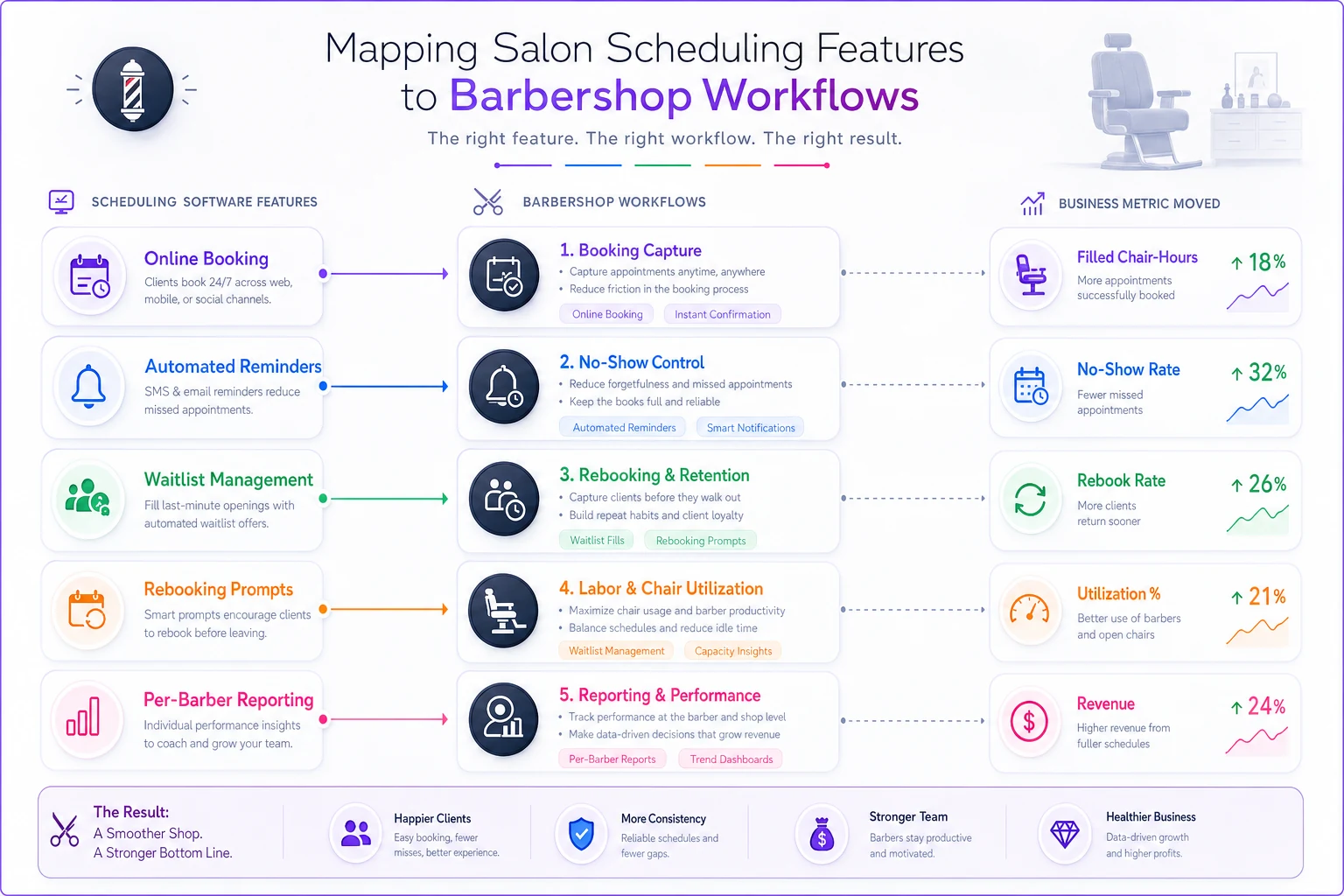
This guide flips the process. Instead of judging tools on what they claim, map each feature back to a workflow and the dollar effects will follow.
Build a prioritized feature checklist — ranked by money, not by marketing
Here's a working checklist. The order matters. Features near the top move revenue directly or prevent the most expensive mistakes. Features near the bottom are nice but rarely worth switching tools over.
Never miss a booking amidst the hustle.
Trimzly helps you schedule, confirm, and manage every client visit seamlessly.
- Unified appointment management
- Automated client reminders
- Optimized staff scheduling
No credit card required
Tier 1 — revenue and loss prevention (non-negotiable)
-
Real-time online booking with live calendar sync (no double-books, ever)
-
Automated confirmations + reminders across text and email, with one-tap reschedule
-
Repeat no-show flagging (so the system remembers who burned you, not just your memory)
-
Rebooking prompt built into checkout
-
Deposit or card-on-file capability for high-risk slots
Tier 2 — labor efficiency and throughput
-
Per-barber calendars with individual service durations and buffers
-
Waitlist that auto-fills cancellations
-
Staff-level reporting (revenue, rebook rate, service mix per chair)
-
Demand-based scheduling views so you can see which hours are dead
Tier 3 — growth and stickiness
-
Client profiles with notes, formula/style history, and photos
-
Memberships and package tracking
-
Review request automation after visits
-
Gift card handling
Tier 4 — convenience (don't switch tools for these)
-
Branded mobile app
-
Social media booking buttons
-
Custom color themes
A pattern worth calling out: shops that struggle with software evaluation almost always get pulled in by a Tier 3 or Tier 4 feature during the demo ("ooh, memberships!") while skipping a Tier 1 gap that costs them every single week. If a tool nails Tiers 1 and 2 but is weak on Tier 3, you can live with that. The reverse will bleed you.
The ROI model: attach dollars to each workflow
This is where a real evaluation separates from a vibe-based one. You estimate the annual dollar impact of the features you care about, then compare that against the tool's annual cost. Rebuild this in a spreadsheet — it's five rows of math.
Using a sample mid-size shop: four barbers, roughly 330–360 appointments a month, average ticket around $38.
-
1. No-show recovery Say your current no-show rate sits around 9% and a solid reminder + deposit workflow pulls it down to about 5%. That's ~4% of ~345 monthly bookings recovered — roughly 14 appointments a month. 14 × $38 = ~$530/month, or about $6,000–$6,500/year.
-
2. After-hours booking capture Shops that add real 24/7 online booking typically see a chunk of appointments land outside business hours — people booking at 11pm. If even 6–8 of those a month wouldn't have called back the next day, that's another 7 × $38 ≈ $266/month, roughly $3,000/year.
-
3. Rebooking lift If checkout-prompted rebooking nudges your rebook rate from, say, 38% to 46%, and pulls one extra visit per year out of a meaningful slice of your client base, the retention math gets large fast. Even a conservative read lands in the $4,000–$8,000/year range for a four-chair shop. Retention is where the numbers get fuzzy but biggest — treat it as a range, not a promise.
-
4. Labor efficiency Waitlist auto-fill and demand-view scheduling might recover a handful of idle chair-hours a week and trim an hour or two of overtime. Call it a modest but real $2,000–$3,000/year.
-
5. Admin time saved If automated reminders and online booking save your front desk or lead barber ~5 hours a week of phone tag at ~$18/hour, that's ~$90/week, roughly $4,500/year in reclaimed labor.
Add a conservative read of those ranges and you're somewhere around $18k–$25k in annual impact for a four-chair shop. Against a tool that costs maybe $150–$300/month ($1,800–$3,600/year), the ROI question basically answers itself — as long as the tool actually delivers on Tiers 1 and 2.
The trap: owners either skip this math entirely and pick on sticker price, or they let a vendor fill in the numbers for them and get fantasy figures. Do it yourself with your real averages. Rough numbers beat guessing every time.
Vendor questions that cut through demo theater
Demos are designed to show you the happy path. These questions force the parts vendors would rather skip. Ask them before you ever see pricing.
-
"Show me what happens when a client reschedules at 6am and the slot gets offered to someone on the waitlist — live, not a slide." If they can't demo it in the actual product, it's half-built.
-
"How does your calendar prevent double-booking when two clients hit 'book' on the same slot at the same time?" Race conditions are where cheap tools fall apart.
-
"When I export my client data to leave you, what format, and does it include notes, history, and photos?" How a vendor answers the exit question tells you a lot about how they operate day-to-day.
-
"What's included at my tier vs. what triggers an upcharge?" Reminders, extra staff seats, and SMS volume are common hidden meters.
-
"What does your SMS reliability look like, and who pays for message overages?" Reminders that don't deliver aren't reminders.
-
"Can I see per-barber retention and rebook rates without exporting to a spreadsheet?" If the reporting can't answer your Tier 2 questions natively, you'll stop using it within a month.
-
"What's your actual uptime, and what happened during your last outage?" Everyone claims 99.9%. Ask about the real incident.
Question #3 is the most revealing. Vendors confident in their product answer migration-out questions easily. Ones that stall or get vague are telling you they rely on lock-in instead of quality.
Integration & migration checklist
Switching tools breaks things if you don't plan it. Before committing, confirm each of these — and run the migration during your slowest week, not your busiest.
-
Payments Does it work with your current processor, or force you onto theirs? Forced processors sometimes carry worse rates — do the math on the per-swipe difference.
-
Client data import Names, contact info, visit history, notes, formulas, photos. Confirm what actually transfers with a test batch before the full cutover.
-
Calendar sync Two-way with Google/Apple if your team relies on personal calendars.
-
Accounting/payroll export Can it feed your bookkeeping without manual re-entry?
-
Reviews & Google Does it integrate with your Google Business Profile for post-visit review prompts?
-
Marketing/email tools If you run campaigns, confirm the client list syncs.
-
Parallel-run window Keep the old system readable for 30–60 days after switching so you don't lose history if something imports wrong.
One overlooked step: run both systems side by side for a week with a handful of test appointments before you fully cut over. Shops that skip the parallel run are the ones who discover on a busy Saturday that recurring appointments didn't migrate.
The decision matrix: score tools on impact, not features
Once you've demoed two or three finalists, score them. Weight the categories by how much money each moves for your shop — not evenly.
| Category | Weight | Tool A | Tool B | Tool C |
|---|---|---|---|---|
| No-show / reminder workflow | 25% | |||
| Rebooking & retention tools | 20% | |||
| Labor / utilization features | 15% | |||
| Reporting that drives decisions | 15% | |||
| Migration & data portability | 10% | |||
| Payments flexibility | 10% | |||
| Total cost of ownership | 5% |
Score each cell 1–5, multiply by the weight, total the columns. The highest weighted score wins — not the cheapest, not the prettiest.
Why weight it this way? Because no-show control and retention are where the dollars live for most shops, and they're also where tools differ the most. Reporting and payments matter, but they're more often "good enough across the board." Cost gets a low weight on purpose — a $40/month difference is noise against an $18k impact range.
Adjust weights for your situation. A solo barber with no front desk might weight admin-saving reminders higher. A three-location group should crank up reporting and data portability. Decide the weights before the demos so you're not rationalizing after the fact.
A real scenario: four-chair shop, mid-switch
A four-barber shop running on a patchwork of a paper book, a free booking widget, and a group text for reminders. The pain: no-shows hovering near 10%, the front desk burning hours on confirmation calls, and no visibility into which barber actually had the best rebook rate.
They ran the evaluation above. Three finalists, scored on a weighted matrix, migration tested on a slow Tuesday. The winning tool wasn't the cheapest or the one with the flashiest app — it scored highest on no-show workflow and native per-barber reporting, their two heaviest weights.
Within about three months: no-shows settled around 5–6%, the front desk got back roughly 4–5 hours a week, and for the first time they could see that one barber's rebook rate lagged the others by a wide margin — a coaching problem they'd never have spotted without the data. That last one tied directly into their barber mentoring and calibration work, because the reporting finally told them where to coach.
The revenue bump was real but uneven — some from recovered no-shows, some from better rebooking, a chunk from chairs no longer sitting empty during cancellations. Nothing dramatic month to month. It compounded.
When switching tools is worth it — and when it isn't
It makes sense when:
-
You're losing money weekly to no-shows or empty chairs and your current tool has no workflow to fix it
-
You genuinely can't see per-barber performance and you're making staffing calls blind
-
Your "system" is actually three disconnected tools held together by manual effort
It's a bad idea when:
-
Your current tool handles Tiers 1 and 2 fine and you're chasing a Tier 3/4 feature
-
You're mid-peak-season (migrate in a slow stretch, always)
-
The only real driver is price and the savings is under a hundred bucks a month
Who should not switch right now: a solo barber whose book is full, no-shows are low, and clients rebook on their own. If the numbers aren't bleeding, the switching cost — data migration, retraining, the inevitable first-week chaos — outweighs the gain. Fix the workflow before you buy a tool to automate a broken one.
Worth noting: the same evaluation logic applies when you're expanding service offerings. If you're building out an inclusive services menu for different hair textures, you'll want a scheduling tool that handles variable service durations cleanly — a Tier 2 feature most shops forget to test during the demo.
Build the spreadsheet and keep it
Set up a simple sheet with three tabs: the ROI model with your real averages plugged in, the weighted decision matrix, and the migration checklist. Reuse it every time a vendor contract comes up for renewal or a flashier tool catches your eye. It turns a fuzzy, rep-driven decision into one you can actually defend.
Salon scheduling software isn't won on feature count. Two tools with identical feature lists can produce wildly different results depending on how well each one executes the handful of workflows that actually touch your revenue. Score the execution, attach the dollars, weight by what your shop loses sleep over — and let the matrix, not the demo, make the call.
Salon scheduling software isn't won on feature count. Two tools with identical feature lists can produce wildly different results depending on how well each one executes the handful of workflows that actually touch your revenue. Score the execution, attach the dollars, weight by what your shop loses sleep over — and let the matrix, not the demo, make the call.
Ready to elevate your barbershop operations?
Join 500+ barbershops using Trimzly to save time, reduce scheduling conflicts, and enhance client satisfaction.