
Most barbershop owners obsess over ranking in the map pack. Fair enough — showing up in the top three when someone searches "barber near me" is worth real money. But there's a quieter problem sitting underneath all that ranking obsession: plenty of shops rank fine and still barely get bookings from their profile.
You can have 400 reviews at 4.8 stars, show up first on Maps, and still watch people bounce without ever tapping a button. The traffic is there. The conversion isn't. And because Google doesn't hand you a clean funnel report, most owners never realize how many booking-ready people they're losing between "found your profile" and "actually booked."
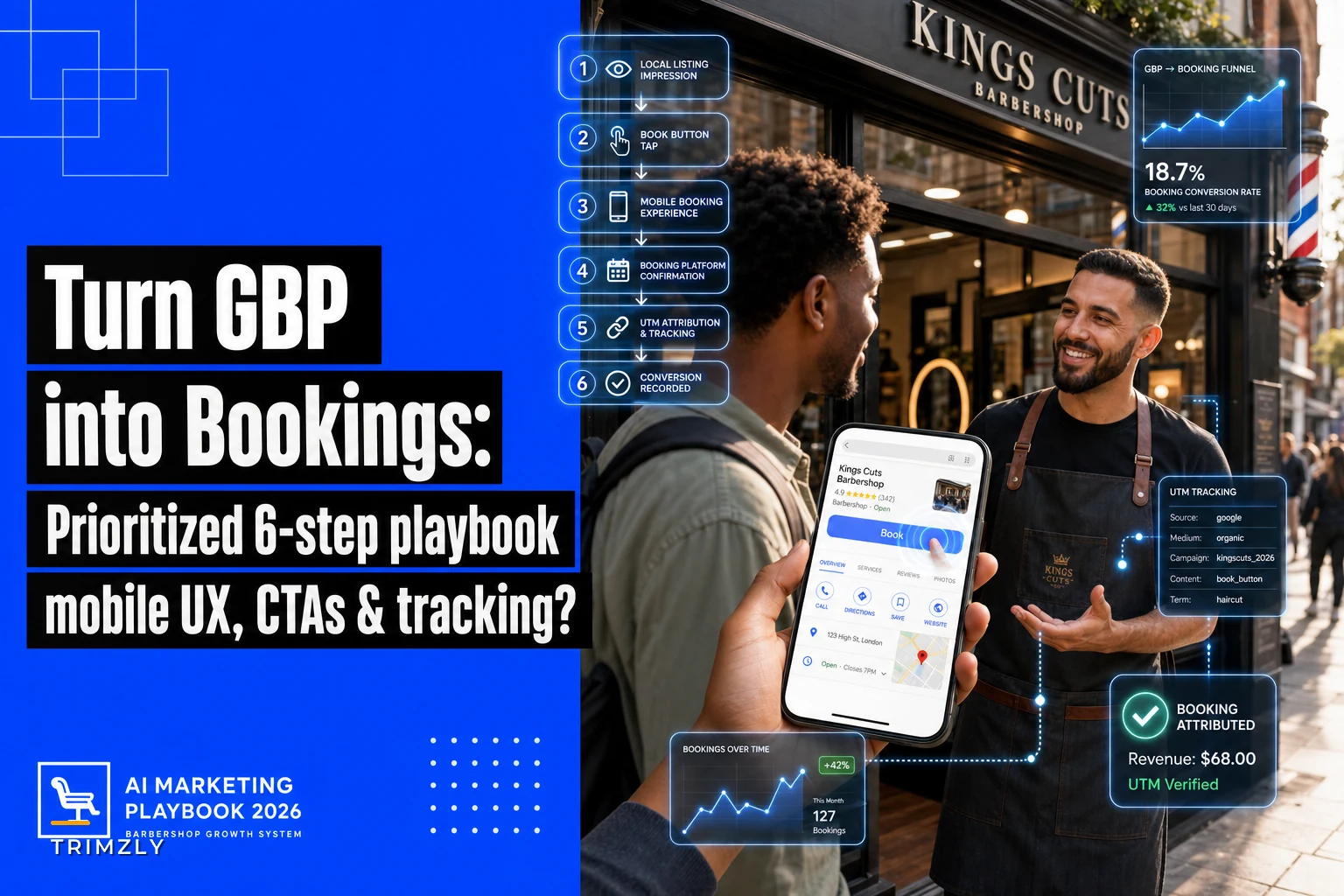
This is a conversion problem, not a visibility problem. So instead of another generic "optimize your GBP" checklist, this is a prioritized playbook — six moves ranked by impact — combined with the kind of booking-UX audit a CRO person would run if they walked into your shop's profile cold. Expected lift ranges included, plus how to actually track whether any of it moved the needle.
First, understand the two-step funnel most owners ignore
The barbershop Google Business Profile booking journey has two distinct stages, and they fail for completely different reasons.
Stage one: Someone searches, sees your profile in results, and taps it. This is where reviews, photos, category, and proximity matter. Most shops are fine here.
Stage two: They're on your profile deciding whether to book right now. This is where most of the leakage happens, and almost nobody audits it.
A person searching "barbershop near me" at 6pm on a Tuesday is not researching. They want a haircut — probably this week, sometimes today. That intent is hot. If your profile makes them do one extra thing — call during business hours, dig for a booking link, figure out whether you take walk-ins — a big chunk of them just tap the next shop instead. Google literally lines up three competitors right next to you.
The whole game is removing friction between hot intent and a confirmed slot. Here's the priority order.
The 6-step optimization, ranked by what actually moves bookings
Ordered by impact-to-effort. If you only do the first two, you'll capture most of the available lift. The rest is cleanup.
Never miss a booking amidst the hustle.
Trimzly helps you schedule, confirm, and manage every client visit seamlessly.
- Unified appointment management
- Automated client reminders
- Optimized staff scheduling
No credit card required
Step 1: Put a real booking link in the "Book" button (highest impact)
The single biggest leak is shops that only have a "Call" button. When someone lands on your profile at 9pm, a call button is useless — you're closed, they're not leaving a voicemail, and they book elsewhere.
Google lets you add a booking action that shows a "Book" button right at the top of your profile. If your scheduling system integrates directly through Google's Reserve partners, the slots show inside Google itself. If not, you can at minimum add your booking URL as the appointment link.
Expected lift: Adding a working Book button to a profile that previously only had Call typically lifts profile-to-booking conversion by a noticeable margin — often in the 15–30% range on booking-driven actions, mostly because you're now capturing after-hours and weekend intent you were quietly throwing away.
Point the Book button directly to the page where customers can pick a barber and a time — not your homepage.
One thing owners get wrong: they add the link but point it at their homepage instead of the actual booking page. Now the person has to hunt again. Point it at the page where they can pick a barber and a time — nothing else.
Step 2: Fix the mobile booking experience the link leads to
Here's the part CRO people care about and barbershop owners almost never check: what happens after someone taps Book?
-
The page loads slow or isn't mobile-optimized, so text is tiny and buttons overlap
-
It asks for account creation before you can even see available times
-
Service menu has 20-something confusingly-named options and no prices
-
You can't tell which barber has the soonest opening
-
The confirmation step demands a deposit with no explanation
Each of these bleeds people. A booking flow that takes more than roughly 60 seconds on mobile is leaking.
Expected lift: Cleaning up an overloaded mobile booking flow — cutting steps, showing prices, removing forced signup — commonly recovers 20–40% of drop-off on the booking page itself. This is often the highest-ROI fix in the whole list, because you're recovering people who already wanted to book.
If you want to see how booking friction ties into the broader first-visit experience, we broke that down in the first-time walk-in to lifetime customer system — the booking page is really step zero of that whole lifecycle.
Step 3: Rewrite your CTA and profile copy to answer the walk-in question
Barbershops have a specific problem salons don't: the walk-in vs. appointment ambiguity. A lot of people scroll your profile trying to answer one question — "can I just show up, or do I need to book?" — and if they can't tell, they hesitate. Hesitation kills conversions.
| Weak profile copy | Copy that converts |
|---|---|
| "Premium barbershop offering quality cuts and grooming." | "Walk-ins welcome, but Fri/Sat book ahead — tap Book to grab a chair." |
| Book button labeled generically | Booking page headline: "Pick your barber & time — takes 30 seconds" |
| No mention of wait times | "Live wait times shown when you book online." |
The converting version reduces uncertainty. It tells people exactly what to expect and what to do next. Uncertainty is the enemy of a tap.
Expected lift: Copy changes alone are smaller — usually a 5–12% bump — but they're free and take maybe ten minutes, so the effort-adjusted return is solid.
Step 4: Load photos that sell the outcome, not the interior
Everyone photographs their shop's exterior and their nice chairs. Fine, but that's not what makes someone book. People book because they saw a fade or a beard shape that looks like what they want.
-
Recent, well-lit result photos — before/after cuts, various hair types
-
One clear photo of each barber so people can pick a person
-
A shot that shows the vibe when it's busy — social proof that the place is alive
Google also weights profiles with frequent, fresh photo activity, so this quietly helps stage-one visibility too. Better to add a few new result shots weekly than dump 40 photos at once and never touch it again.
Expected lift: Hard to isolate cleanly, but profiles with strong, current result photos consistently outperform interior-only profiles on tap-through and booking rates. A modest but real contributor.
Step 5: Turn on and actually answer messaging & the Q&A
The Q&A section on your profile is public and, weirdly, often gets answered by random strangers instead of the business. If someone asks "do you take card?" or "do you do kids' cuts?" and it sits unanswered for months, that's a lost booking sitting in plain sight.
Seed your own Q&A with the questions you actually hear: parking, walk-in policy, deposit rules, whether you do skin fades, price ranges. You're pre-handling objections before someone has to ask.
Messaging is similar — if you enable it, you have to be responsive. A slow reply converts worse than no messaging at all. If nobody's watching the inbox, leave it off rather than let it go stale.
Step 6: Get review velocity feeding the profile continuously
Reviews affect stage-one ranking, but they also affect stage-two trust. A profile that got its last review four months ago reads as sleepy. Consistent recent reviews signal an active, in-demand shop.
The mechanics of getting reviews without awkward asks is its own topic, but for booking-conversion purposes the key insight is recency and specificity — a review from last week that mentions a specific barber and service converts a browser better than a generic five-star from a year ago.
A quick CRO-style booking audit you can run in 20 minutes
Go through this like a first-time customer would, on your phone, honestly:
-
My profile has a working Book button (not just Call)
-
The Book button leads directly to a page where I can pick a time — not my homepage
-
I can complete a booking in under 60 seconds on mobile
-
The booking page does not force account creation before showing times
-
Prices are visible before I commit
-
I can clearly see which barber is available soonest
-
My profile answers "walk-in or appointment?" in the first line
-
There are recent result photos, not just interior shots
-
The Q&A section is answered by me, not strangers
-
My most recent review is less than two weeks old
Every unchecked box is a specific, fixable leak. Fix them roughly in the order listed — that's the priority ranking doing its work.
How to actually track if any of this worked
Most shops make changes, feel good about it, and never measure anything. Here's a tracking setup a single-location shop can realistically maintain.
-
Baseline your GBP Insights. Before changing anything, note your current "Bookings," "Website clicks," and "Calls" for the last 30 days from the Google Business Profile performance tab. Screenshot it.
-
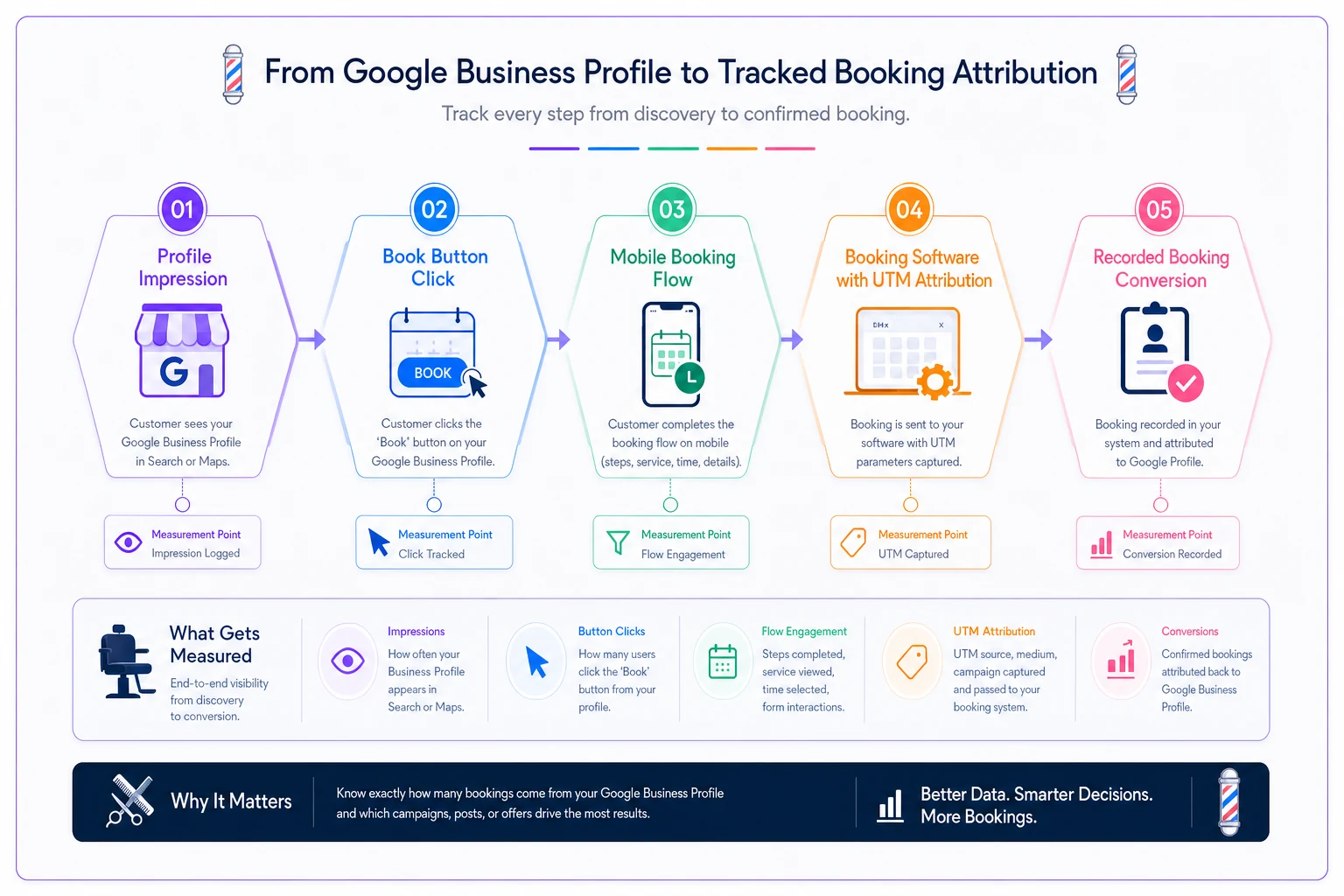
Add a tracking parameter to your booking link. Append something like
?utmsource=gbp&utmmedium=profileto your booking URL. Now your scheduling software can tell you how many bookings came specifically from Google versus everywhere else. -
Track the funnel in two numbers profile interactions (from GBP Insights) and completed bookings attributed to that GBP link (from your booking software). Divide bookings by interactions — that's your conversion rate. That single ratio is the number to move.
-
Change one thing at a time when possible. If you flip on the Book button and redo your photos in the same week, you won't know which one moved the needle. Space out the bigger changes by a week or two.
-
Review after 30 days. Compare conversion rate to baseline. A shop going from Call-only to a clean Book flow should see a clear directional lift within a month if traffic held steady.
One honest wrinkle: seasonality and traffic swings will muddy month-to-month numbers. That's why you track the ratio — bookings per interaction — rather than raw booking count. The ratio controls for how much traffic you got that period, which matters more than most owners realize.
Here's a quick visual to think about the tracking workflow.
One honest wrinkle: seasonality and traffic swings will muddy month-to-month numbers. That's why you track the ratio — bookings per interaction — rather than raw booking count. The ratio controls for how much traffic you got that period, which matters more than most owners realize.
A real scenario, numbers and all
A two-chair shop in a mid-size town ranked well — usually top three for local barber searches — but bookings from Google felt flat. Their profile had only a Call button, and their booking link (buried in the site footer) pointed to a homepage with no obvious scheduling path.
Over about three weeks they did three things: added a proper Book button pointing straight to the scheduling page, rebuilt that page so it worked on mobile and showed prices and barber availability up front, and rewrote the profile line to read "Walk-ins welcome — weekends book ahead." Nothing else changed about their ranking or ad spend.
GBP-attributed bookings went from somewhere around 40-something a month to around 70 over the next two months. The conversion ratio — bookings per profile interaction — roughly doubled, though raw numbers bounced week to week. The owner's read on it: "Same people were finding us the whole time. We were just making it annoying to book."
That's really the whole thesis. Visibility wasn't the bottleneck.
When this is worth your time — and when it isn't
When it makes sense: You already rank decently but bookings feel disconnected from your visibility. That gap almost always lives in the six steps above, and the fixes are cheap.
When it's the wrong starting point: If you're genuinely invisible in Maps — not showing up for "barber near me" at all — booking-UX won't save you, because there's no traffic to convert. Fix visibility first. Category, proximity signals, and review volume come before conversion tuning. Our channel-priority local marketing roadmap is the better place to start if you're not appearing at all.
Who can skip parts of this: A pure walk-in shop with no online booking can ignore Step 2's booking-page audit — but you must nail Step 3's copy so people know walk-ins are the whole model, and you should still add hours and a "call to check wait" prompt.
The one thing to remember
Ranking gets people to your profile. Everything after that — the button, the mobile flow, the copy that kills uncertainty, the photos that sell the result — decides whether that visit turns into someone actually sitting in your chair.
Most shops pour effort into the top of the funnel and leave the bottom half broken. Run the 20-minute audit, fix the leaks in priority order, tag your booking link so you can measure it, and check the ratio in 30 days. The traffic you're already earning is worth a lot more once the path to "Book" stops fighting the customer.
Most shops pour effort into the top of the funnel and leave the bottom half broken. Run the 20-minute audit, fix the leaks in priority order, tag your booking link so you can measure it, and check the ratio in 30 days. The traffic you're already earning is worth a lot more once the path to "Book" stops fighting the customer.
Ready to elevate your barbershop operations?
Join 500+ barbershops using Trimzly to save time, reduce scheduling conflicts, and enhance client satisfaction.