


Most barbershop owners don't have a data problem. They have a reconciliation problem. The booking app says one number, the card processor says another, the review dashboard shows something different, and the spreadsheet you built last spring stopped matching reality around month three. Every one of those tools is technically "right" — they just measure different things, at different times, using different definitions of what counts as a completed sale.
That gap is where money leaks. Not dramatically, but quietly. A double-counted tip here, a refunded appointment that never got backed out there, a no-show the calendar forgot to flag. On its own, none of it matters much. Stacked across a year, it turns your P&L into a guess.
So this isn't a piece about picking better software. It's about how to wire the tools you already have into one place that tells the truth — a real barbershop data architecture — so you stop arguing with your own dashboards.
The core problem: every tool thinks it's the boss
Nobody tells you this when you buy a booking platform, a payment terminal, and a review tool separately: each one assumes it is the center of your business. Your booking software thinks an appointment is the fundamental unit. Your processor thinks a transaction is. Your review platform thinks a customer visit is. Your accountant thinks a deposit is.
None of them are wrong. But when you try to answer a simple question — "how much did chair 3 actually make last Tuesday?" — you're forced to mentally join four systems that were never designed to talk to each other.
This usually surfaces the first time you try to calculate profit-per-chair honestly. You pull revenue from the processor, hours from the schedule, product sales from the POS, and by the time you've cross-referenced it all, you've burned an afternoon and you're still not sure the tip allocation is right. Multiply that by every reporting question you'll ever have, and you understand why most owners just stop asking.
The fix is deciding — on purpose — which system holds the master version of each type of information. That's what a single source of truth actually means. Not one app to rule them all, but one agreed-upon home for each fact.
Mapping your toolset before you touch anything
Before any integration work, you need a plain-language map of what you own and what each thing is authoritative for. Most shops have never written this down, which is exactly why the systems drift.
Never miss a booking amidst the hustle.
Trimzly helps you schedule, confirm, and manage every client visit seamlessly.
- Unified appointment management
- Automated client reminders
- Optimized staff scheduling
No credit card required
A typical small-shop stack looks something like this:
| Data type | Where it's created | Who *should* own the truth | Common conflict |
|---|---|---|---|
| Appointments & no-shows | Booking app | Booking app | Walk-ins logged only in POS |
| Payments & refunds | Card processor / POS | Processor | Tips split across cash + card |
| Client contact info | Booking app + POS | Booking app | Duplicate profiles per barber |
| Reviews & ratings | Google / review tool | Review platform | No link back to the actual visit |
| Product / retail sales | POS | POS | Not tied to the service ticket |
| Payroll & commission | Spreadsheet / payroll app | Payroll system | Manual re-entry from POS |
The point of this table isn't the specific rows — yours will look different. The point is forcing a decision in that third column. When two systems disagree about a client's phone number, which one wins? If you can't answer that instantly, you don't have an architecture. You have a pile of tools.
One thing worth calling out specifically: the most common conflict in barbershops isn't payments, it's client identity. When each barber builds their own client list inside the booking app, the same person becomes three different "customers." Your rebook rate looks worse than it is, your marketing double-texts people, and lifetime-value math becomes meaningless. Identity is usually the first thing you should standardize, because almost everything else hangs off it.
A prioritized integration roadmap (don't do it all at once)
The instinct is to connect everything on day one. That's how shops break their booking flow and spend a Saturday on the phone with support. Sequence matters. Here's the order that tends to hold up, from lowest-risk to highest:
-
Payments → source of truth first. Money is the least ambiguous thing you have. A charge either cleared or it didn't. Get your processor feeding a central ledger before anything else, because it becomes the anchor everything reconciles against.
-
Bookings → payments. Link each completed appointment to its transaction. This is where you catch the "serviced but never charged" gap and the no-show that quietly stayed on the calendar as revenue.
-
Client identity dedupe. Once bookings and payments are joined, collapse duplicate profiles. Do this after the money is linked, so you can use transaction history to confirm who's actually the same person.
-
Reviews → visits. Connect review activity back to the appointment that triggered it. This is where a structured automated review and triage workflow pays off — because a five-star review tied to a specific barber and service is data, while a floating review is just decoration.
-
Retail & product sales. Fold add-on sales into the service ticket so average-ticket math includes product.
-
Payroll & commission last. It's the highest-stakes and most manual. Only automate it once everything upstream is trustworthy, because garbage in becomes an angry barber on payday.
Notice payroll comes last, not first, even though it feels the most urgent. If you automate commission off numbers that aren't yet reconciled, you'll pay people wrong and burn trust faster than any spreadsheet ever could.
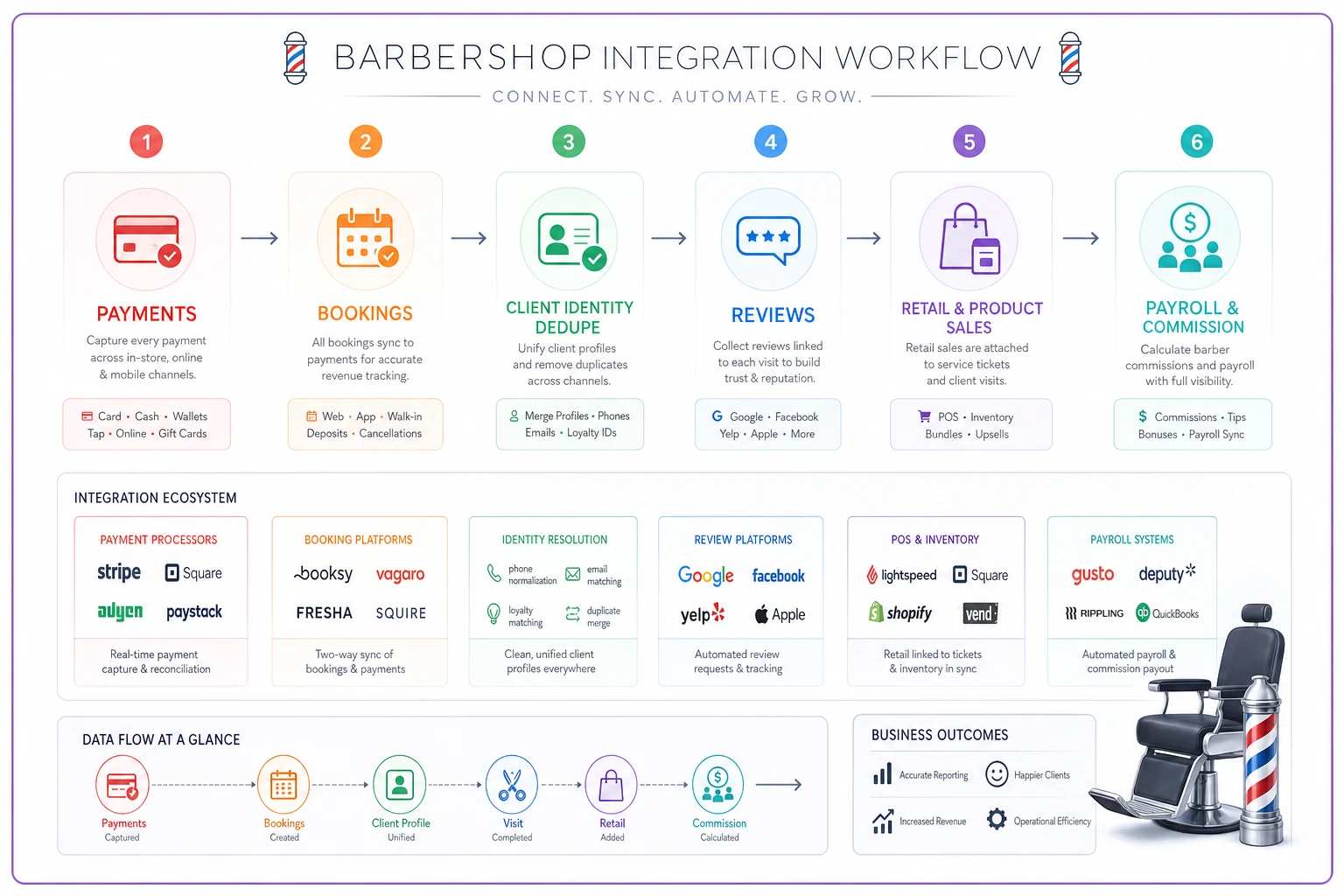
A quick visual of this sequence can help when planning integrations.
Notice payroll comes last, not first, even though it feels the most urgent. If you automate commission off numbers that aren't yet reconciled, you'll pay people wrong and burn trust faster than any spreadsheet ever could.
Lightweight ETL: you don't need a data warehouse
ETL — extract, transform, load — sounds like enterprise territory. For a one-to-four-chair shop, it's much simpler than the acronym suggests. You're just pulling data out of each tool, cleaning it up, and dropping it somewhere central on a schedule.
-
Manual export + a maintained sheet. Fine for a solo operator or a single location under roughly 300 monthly visits. You export weekly, clean it, and reconcile. Cheap, but it breaks the moment you get busy or hire someone who forgets to do it.
-
Native integrations / connectors. Most modern booking and payment tools already talk to each other if you turn the setting on. This is the sweet spot for most single-location shops. You're not building anything — you're enabling the pipes and defining what "matched" means.
-
A workflow platform that centralizes it automatically. This is where AI-assisted operational software earns its place. Instead of you exporting and matching by hand, the platform pulls from booking, payments, and reviews continuously, flags the mismatches, and hands you a reconciled view. The value isn't magic — it's that the boring, error-prone joining work happens without a human remembering to do it every Friday.
Decide what "a completed visit" means before you decide how to move the data.
Honest framing: the ETL method matters far less than the definitions underneath it. A fancy automated pipeline built on fuzzy rules is worse than a careful spreadsheet built on clear ones. Decide what "a completed visit" means before you decide how to move the data.
Measurement contracts: the part everyone skips
This is the section that separates shops with clean numbers from shops that argue about them indefinitely.
A measurement contract is just a written agreement about what a metric means. "Rebook rate" — does that mean the client booked their next appointment before leaving, or booked again within 30 days, or within any timeframe at all? Those are three completely different numbers, and if you and your software vendor disagree on the definition, your dashboard will be "wrong" in a way you can never fully explain.
-
Completed visit serviced and paid, or just serviced?
-
Revenue gross, or net of refunds and processing fees?
-
No-show missed with no contact, or does it include late cancels?
-
New client first-ever visit, or first visit to this location?
-
Attributed booking which channel gets credit when someone finds you on Google but books through a link? Your GBP-to-booking approach only produces trustworthy attribution numbers if this is defined up front.
Where this bites people: two locations reporting "rebook rate" using different definitions, with the owner benchmarking one against the other. One barber looks like a star, the other looks lazy, and the entire gap is a definitional mismatch nobody documented. Written definitions are what prevent you from making a staffing decision off a phantom problem.
A short real scenario
A two-chair shop running somewhere around 330–360 visits a month had a nagging feeling their revenue reporting was off. The booking app showed strong monthly volume, but the deposits never quite matched.
When they finally reconciled bookings against the processor for one month, they found roughly 18 appointments marked "completed" in the calendar with no matching transaction — a mix of comped cuts nobody logged, a barber's friends-and-family visits that never got recorded, and a handful of genuine "serviced but forgot to charge" cases. Somewhere in the range of $600–$800 in a single month, most of it unintentional.
Nothing was stolen. No villain. The systems just never talked, so the gap was invisible. Once they linked the two feeds and set a simple rule — every completed appointment must resolve to a transaction, a comp, or a documented exception — the leak mostly closed within two billing cycles. The bigger win wasn't the recovered money. It was that the owner finally trusted the number, which meant they could start making real decisions off it.
Rollback and migration checklists (because things will break)
Any time you change how data flows — connecting a new tool, migrating platforms, redefining a metric — you need a way back. Owners who skip this are the ones who end up with a broken booking calendar on their busiest Saturday. If you're moving platforms entirely, this pairs with a proper staged migration playbook so bookings never go dark.
Before you flip any integration live, run through this:
-
Full export saved offline. Bookings, clients, and transactions exported and stored before you change anything. Non-negotiable.
-
A parallel period. Run old and new side by side for at least one full pay cycle. Don't cut over cold.
-
A single reconciliation check. Pick one metric — usually daily revenue — and confirm old and new agree for a week straight before trusting the new source.
-
A named rollback trigger. Decide in advance what failure looks like ("bookings mismatch by more than X, or any client can't be found") and who has authority to pull the plug.
-
A rollback window. Keep the old system live and paid-for until you've closed a full month clean. Cancelling early to save one subscription fee is how people lose data permanently.
The mistake here is emotional, not technical. Once the new setup is mostly working, owners want to declare victory and shut off the old one. Resist it. The bugs you haven't found yet are the ones that show up at month-end, and by then the old data is gone.
When this actually makes sense — and when it doesn't
Build this out when: you're running more than one barber, your reporting takes more than an hour to trust, or you're thinking about a second location. Multi-barber and multi-location shops cannot run on gut feel and mismatched dashboards — the drift compounds with every chair.
Hold off when: you're a true solo operator doing your own books, under a couple hundred visits a month, and you can reconcile everything in the time it takes to drink a coffee. A single well-maintained spreadsheet with clear definitions genuinely beats an over-engineered pipeline you'll never maintain. Architecture should match your actual scale, not the scale you're imagining.
Who should NOT do this yet: anyone whose underlying definitions are still fuzzy. If you can't say what "completed visit" means in one sentence, connecting more tools just moves the confusion faster. Fix the definitions first. The plumbing comes after.
The bigger picture
A barbershop data architecture isn't a tech project — it's an operating decision about which version of reality you're going to run the business on. The shops that scale cleanly aren't the ones with the fanciest tools. They're the ones where every number resolves back to one agreed-upon source, where "completed visit" means the same thing on Monday as it does at month-end, and where a new tool has to earn its place by proving it matches the truth before anyone trusts it.
Do the boring work first: map your tools, pick your authoritative source for each fact, write down your definitions, sequence the integrations, keep a rollback ready. When you get that right, the dashboards finally start agreeing with each other. And when your numbers stop fighting, you can actually start using them to run the business — which was the whole point.
Do the boring work first: map your tools, pick your authoritative source for each fact, write down your definitions, sequence the integrations, keep a rollback ready. When you get that right, the dashboards finally start agreeing with each other. And when your numbers stop fighting, you can actually start using them to run the business — which was the whole point.
Ready to elevate your barbershop operations?
Join 500+ barbershops using Trimzly to save time, reduce scheduling conflicts, and enhance client satisfaction.