

Most barbershop owners don't think about technology governance until the morning it fails. The booking app won't load. Payments are declining for no reason. The tablet at the front desk is throwing an error nobody's seen before, and there's a line of four guys waiting while the barber has no clue whether the 9:15 is actually confirmed.
That's the thing about the tools running your shop — they feel invisible right up until they cost you a full day of revenue.
Governance sounds like a corporate word, and honestly it is. But strip away the jargon and it just means: you have written rules for how your tools connect, how you test changes before they go live, and how you roll back when something breaks. No IT department required. Just a few checklists and some vendor agreements you actually enforce.
This is the piece most shops skip. They pick decent software, get it working, and then treat the whole setup like plumbing — fine until it floods the floor. What follows is the system for making sure a vendor change or an outage becomes a 20-minute annoyance instead of a lost Saturday.
The real problem isn't the software — it's the seams between the software
What breaks in practice is almost never one tool failing on its own. It's the connection between tools going quiet.
A typical setup looks like this: bookings come in through one system, payments run through another, and client history lives in your CRM or point-of-sale. Those three talk to each other through integrations — little bridges passing data back and forth. When you change one vendor, or one of them pushes an update, the bridge is what cracks.
The classic version: a shop switches their payment processor to save on fees. Bookings still work. Payments still work. But the new processor doesn't write the transaction back to the client record the old way, so now your rebook reminders are firing off wrong totals, your daily reconciliation doesn't match, and nobody notices for three weeks until the numbers don't add up.
That's a governance failure, not a software failure. Both tools were "working." The seam between them wasn't tested, and nobody owned the connection.
If you haven't already mapped where your data actually lives and how it flows, that's the real starting point — we go deep on it in Barbershop data architecture for a single source of truth. Governance sits on top of that architecture. You can't govern connections you can't see.
A non-technical integration checklist you can actually use
You don't need to understand APIs. You need to know what each connection is supposed to do and how to tell when it stops doing it. Run this whenever you add a tool, switch a vendor, or approve a major update.
Never miss a booking amidst the hustle.
Trimzly helps you schedule, confirm, and manage every client visit seamlessly.
- Unified appointment management
- Automated client reminders
- Optimized staff scheduling
No credit card required
The bookings → payments → CRM checklist:
-
[ ] A test booking made in the booking system shows up correctly in the calendar within a minute
-
[ ] That same booking's payment (deposit or full) processes and shows the right amount
-
[ ] The completed transaction writes back to the client's record with correct service, price, and tip
-
[ ] The client's visit count and last-visit date update automatically
-
[ ] A cancellation in one place cancels or updates in all the others
-
[ ] Rebook reminders pull the correct service and correct barber
-
[ ] Refunds process and reflect in the client record without manual re-entry
-
[ ] Reporting totals (daily sales, service mix) match what the front desk actually rang up
The trick most owners miss: you test with a real, end-to-end scenario, not a feature checklist. Don't ask "does the calendar work?" Ask "if a walk-in books, pays a deposit, gets a cut, and adds a beard trim — does every system end up agreeing on what happened?"
Run your end-to-end test during a slow period so you can see the full flow without interrupting customers.
When those systems disagree, that's where money leaks. Reconciliation eats an hour a day, reminders go out wrong, and your reporting quietly lies to you.
SLA negotiation: the conversation vendors hope you skip
An SLA — service level agreement — is the vendor's promise about uptime, support speed, and what happens when they fail you. Most barbershop owners never negotiate one. They click "agree" on the terms and assume the software company will handle it.
Then the outage hits on a Friday afternoon and support responds Monday.
You don't have the leverage of a 40-location chain, but you have more than you think — especially before you sign. Here's what to actually push on:
| What to ask for | Weak answer | What good looks like |
|---|---|---|
| Uptime guarantee | "We're usually reliable" | A stated % (99.9% or better) with credits when they miss it |
| Support response time | "We'll get back to you" | Defined hours; priority path for "payments/bookings are down" |
| Data export | "You can request it" | Self-serve export of your bookings + client data, anytime, in a usable format |
| Outage communication | Nothing in writing | A status page and a promise to notify you during incidents |
| Change notice | Updates whenever | Advance notice before breaking changes to integrations |
| Offboarding | Vague | Clear terms for getting your data out if you leave |
The single most important line in any of these agreements: your data export terms. If you can't get your client history and booking records out cleanly, you're not a customer — you're a hostage. Every vendor sounds great until you try to leave. Ask before you sign how the export works, and if possible, actually test it during your first month.
For a fuller breakdown of what to evaluate before committing to any platform, our software feature checklist and decision matrix covers the selection side in detail. SLA terms should be part of that same decision, not an afterthought.
Measurement contracts: agree on what "working" means before it breaks
This is the concept almost nobody applies, and it's the one that saves the most grief.
A measurement contract is a simple agreement — with yourself and your vendor — about the specific numbers that define "the system is healthy." Not a feeling. Numbers you can actually check.
Why this matters: when something goes half-wrong, you'll spend days wondering whether it's a real problem or just a slow week. Bookings feel a little off. Payments seem fine but reconciliation is out by a bit. Without a baseline, you can't tell a genuine issue from noise.
-
Bookings per week
roughly 280–340
-
Deposit capture rate
around 85–90% of online bookings
-
Failed payment rate
under 2%
-
Reconciliation match
daily totals agree within a couple of dollars
-
Reminder delivery
95%+ of scheduled messages actually send
Now these become your alarms. When failed payments jump from under 2% to 6% overnight, you don't wonder — you know something broke, and you know when. Measurement turns "something feels off" into "the payment write-back stopped working Tuesday at noon." That's the difference between fixing it in an hour and discovering it at month-end.
Modern operational platforms make this easier by surfacing these numbers in one place, and some will flag anomalies automatically instead of waiting for you to notice. But even a whiteboard with your normal ranges written on it beats having no baseline at all.
Simple rollback rules that keep the floor running
The mindset shift worth making: every change should be reversible, and you should know how to reverse it before you make it.
-
Never change two systems the same week. If you're switching payments, don't also migrate your CRM. When something breaks, you need to know which change caused it.
-
Keep the old tool alive for 30 days. Don't cancel the old payment processor or booking system the day the new one goes live. Overlap costs you a little; a hard cutover with no fallback costs you a Saturday.
-
Change on your slowest day. Tuesday morning, not Friday afternoon. Give yourself hours of low traffic to catch problems.
-
Define the trigger in advance. "If failed payments cross 5%, or bookings stop writing to the calendar, we roll back." No debating in the moment.
-
Assign one person to watch the numbers for the first 48 hours after any change, against your measurement contract.
-
Write down the reverse steps before you flip the switch. If rolling back takes more than 15 minutes or you're not sure how, you're not ready to make the change yet.
A simple rollback flow is easy to visualize:
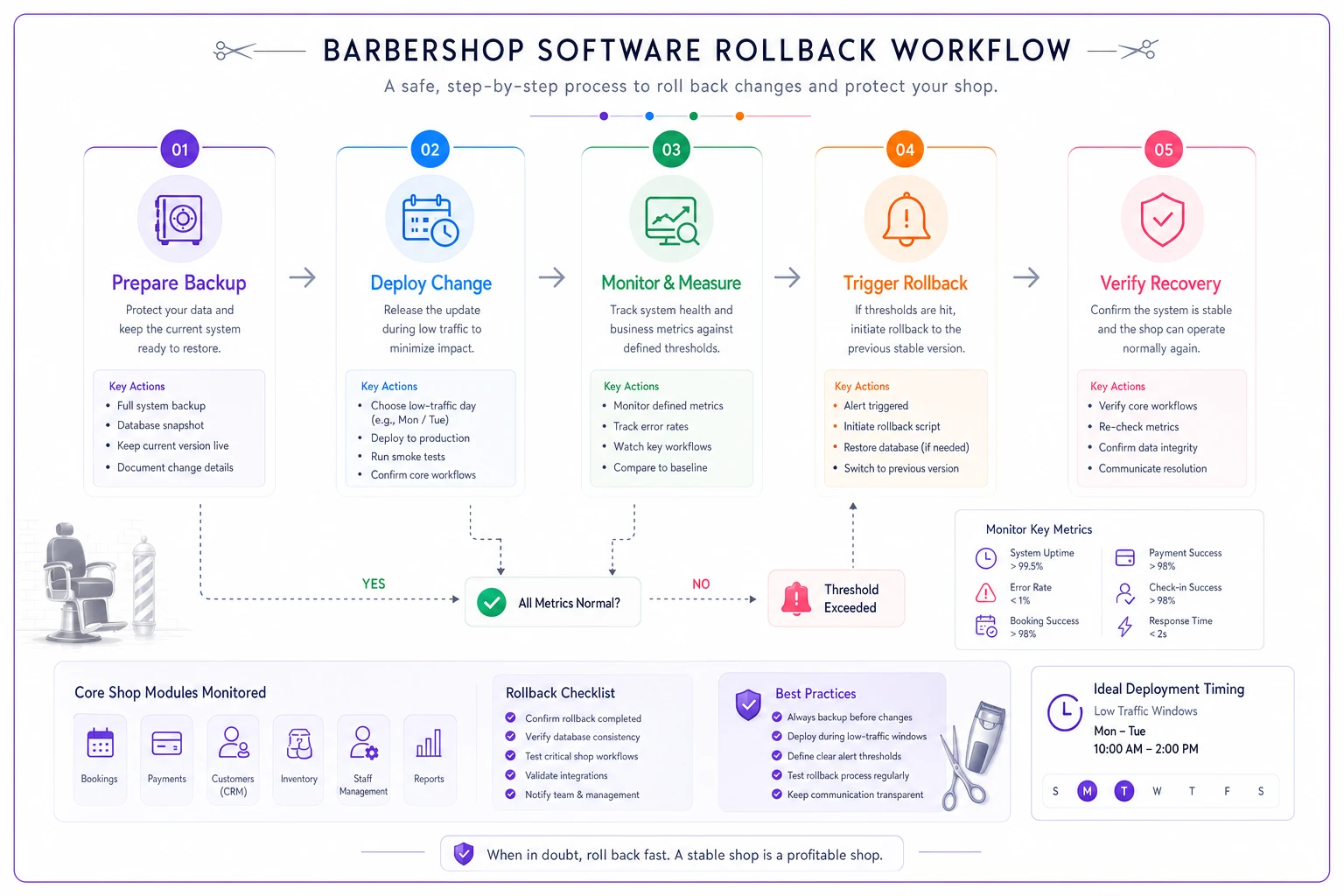
This is the operational spine of switching tools safely. If you're planning an actual platform move, pair these rollback rules with our staged migration playbook, which walks through moving software without losing bookings mid-transition.
When a hard cutover is actually fine
Rollback discipline matters most when money or bookings are on the line. If you're switching something low-stakes — a review-request tool, a marketing app that doesn't touch your calendar or payments — a clean cutover is fine. Reserve the overlap-and-rollback effort for the three systems that actually run the floor: bookings, payments, and client data. Governing everything with the same intensity just burns your time.
The vendor QBR: a 30-minute review that changes how vendors treat you
QBR stands for quarterly business review. It's a standing check-in with each major vendor. Sounds like overkill for a shop — it isn't, and here's why: vendors behave differently when they know you're keeping score.
You don't need a formal meeting for every tool. For the two or three that run your core operations, a short quarterly review keeps them accountable and keeps you informed about changes coming down the pipe.
A simple vendor scorecard you can fill out in a few minutes:
| Dimension | Score (1–5) | Notes |
|---|---|---|
| Uptime — did it stay up? | Any outages this quarter? | |
| Support responsiveness | How fast on real issues? | |
| Did integrations stay stable? | Any silent breaks? | |
| Value for the price | Fees creeping up? | |
| Communication on changes | Warned you before updates? |
Track these quarter over quarter. A vendor whose score is sliding — support getting slower, fees climbing, integrations breaking more often — is telling you it's time to start planning an exit before you're forced into one under pressure.
The pattern worth watching: vendors rarely fail all at once. They degrade. Support gets a little slower, updates get a little buggier, the roadmap stalls. A scorecard catches the drift while you still have time to move calmly instead of scrambling.
A real scenario
A two-chair shop switched booking platforms to get better online scheduling. The new tool worked great for bookings. What nobody tested was the write-back to their payment and client records.
For about three weeks, completed appointments weren't updating client visit counts or last-visit dates. Their rebook reminders — which normally drove a solid chunk of repeat traffic — quietly stopped firing for anyone who'd booked through the new system, because those clients looked "brand new" with no history.
By the time the owner noticed, rebook volume had dropped noticeably and they estimated somewhere in the range of $1,800–$2,400 in appointments that simply never got prompted to come back. The fix took a technician a couple of hours. The three weeks of silence is what cost them.
With a measurement contract in place — "reminders should send to 95%+ of recent clients" — that drop would've been obvious in days, not weeks. The tool wasn't broken. The seam was. And nobody was watching the seam.
Who should not overthink this
If you're a solo barber running one calendar and one payment method with no integrations, you don't need a full governance system. Keep a data export handy, know how to roll back a change, and move on. Governance scales with complexity.
It becomes essential the moment you've got multiple tools passing data to each other, staff who depend on those tools, and enough volume that a lost day actually hurts. That's usually the same point where you stop being able to hold the whole setup in your head — and where written rules start earning their keep.
Bringing it together
Technology governance for a barbershop isn't about becoming technical. It's about refusing to be surprised. You map how your tools connect, you agree on what "working" means in real numbers, you negotiate for your data and your uptime, and you never make a change you can't undo.
Do that, and vendor switches stop being risky. Outages become short. The shops that get burned aren't the ones running bad software. They're the ones who never wrote down what happens when the software lets them down.
Technology governance for a barbershop isn't about becoming technical. It's about refusing to be surprised. You map how your tools connect, you agree on what "working" means in real numbers, you negotiate for your data and your uptime, and you never make a change you can't undo.
Ready to elevate your barbershop operations?
Join 500+ barbershops using Trimzly to save time, reduce scheduling conflicts, and enhance client satisfaction.